 Hockey Hub
FOR HOCKEY COACHES
A hockey video review workflow coaches can repeat
Useful hockey video review connects what happened on the ice with what a player noticed and what they will try next. A small number of well-chosen moments can make that conversation easier to follow than a long list of corrections.
Begin with a question, not the whole game
Choose a focus that a player can recognize on video. “Create more offense” is broad; “check over your shoulder before receiving a rim” gives the review a specific action to look for. For a team review, a shared focus could be support underneath the puck or the first decision after a defensive-zone recovery.
Keep the question separate from the result. A successful play can include a decision worth discussing, and a turnover can follow a reasonable read. Save the context that explains the choice rather than judging a player from the final frame alone.
Prepare moments that show the decision
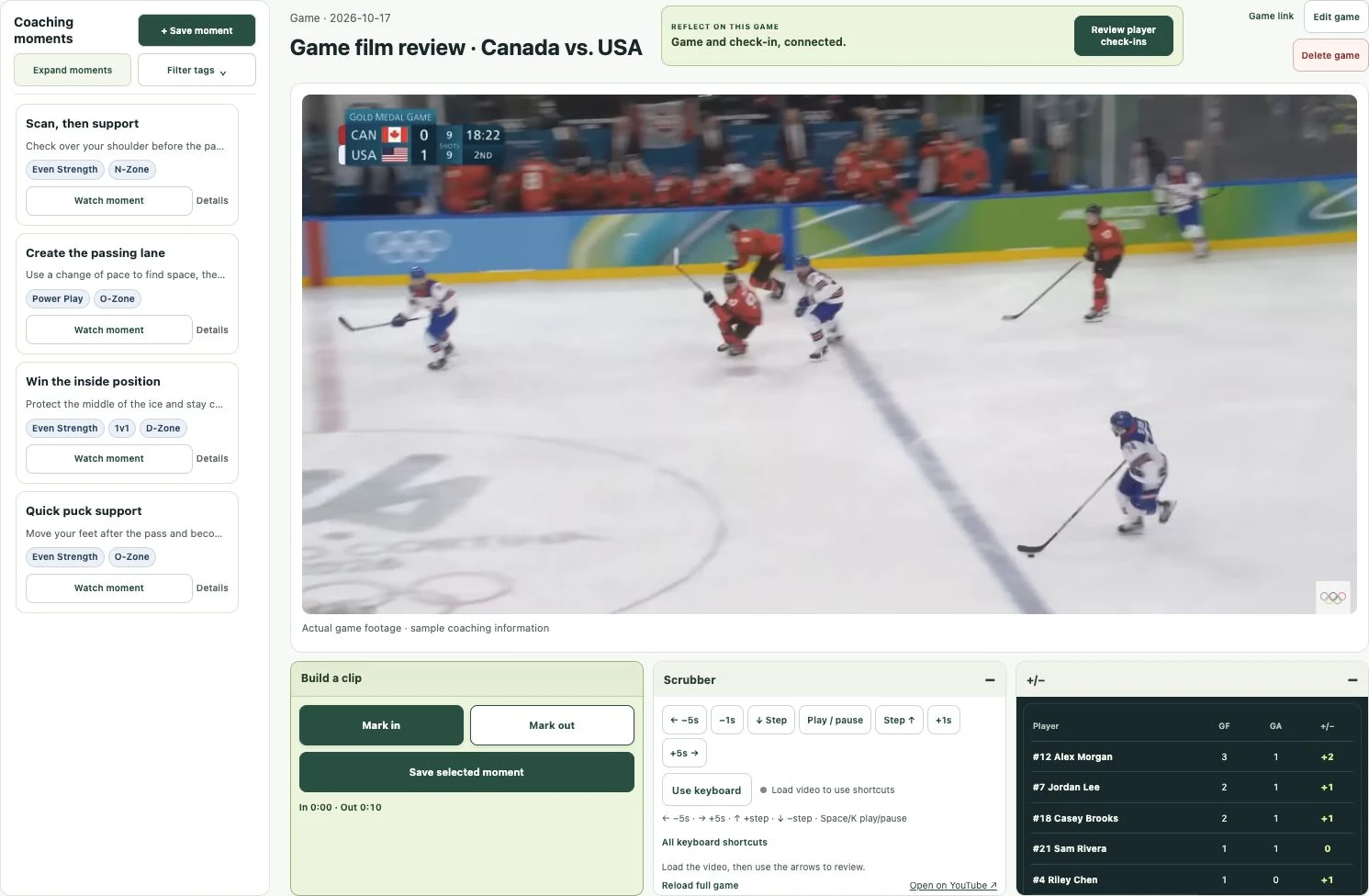
- Create the game or scrimmage and connect an embeddable YouTube link.
- Find the play and use Mark In before the relevant decision. Use Mark Out after enough of the outcome is visible.
- Save a descriptive title such as “Weak-side support after recovery.” Add a short note with one observation and one question.
- Tag the situation: for example Even Strength and D-Zone. Add the players on the ice when their involvement helps organize the review.
- Choose the audience separately. Share with the team or selected players; a player tag does not change who is allowed to watch.
- Link a check-in to the game and select the focus topics you want players to reflect on.
Write a note that opens a conversation
A useful note separates observation from interpretation. For example: “You moved below the puck as the defender recovered it. What support options did you see when the puck reached the wall?” The first sentence points to something visible; the question invites the player to explain the read.
Use a private assigned moment for an individual conversation and a team moment for a shared pattern. Avoid treating every clip as a correction. Include a moment that demonstrates a repeatable habit so the player can describe what made it work.
| Instead of a vague note | Try an observable question |
|---|---|
| Be more aware. | Where did you look before the pass arrived? |
| Move the puck faster. | Which option was available before the defender closed? |
| Work harder. | What did your first three strides do after possession changed? |
Connect the clip to a player check-in
The check-in gives the player a place to record their perspective. Choose a few relevant questions rather than assigning every possible topic after every game. In Hockey Hub, players answer rating questions one at a time on their phone, then can review before submitting.
Topic trends can help identify a conversation worth revisiting. A rising or falling self-rating is not proof that a skill improved or declined. Consider the opponent, role, game situations and changes to the question set. Ask the player for an example behind the number.
Use a simple weekly rhythm
| When | A practical task | What to keep |
|---|---|---|
| After the game | Choose a small set of moments around one focus. | Context, a clear title and one question. |
| Before the next practice | Send a focused check-in. | The player’s own answer and next action. |
| At practice | Create a situation that lets players rehearse that action. | A cue the group understands. |
| After the next game | Revisit one comparable moment. | What the player noticed this time. |
What the software does and what the coach still does
Hockey Hub keeps the game, saved time ranges, tags, player audiences, questions and reflections connected. Coaches can filter the current game’s clips by a tagged player and combine situation filters. Players can use My clips to find visible moments where they were tagged or privately assigned.
The coach still selects the moments, writes notes and tags the players. Hockey Hub does not currently find shifts automatically, identify every player with AI or export edited video files. YouTube controls whether the footage is available to play.